
Claude Is Burning Through Your Limit Faster Than Ever. Anthropic Won't Tell You Why.
Anthropic tightened usage limits, gave you no controls to manage it, and Sam Altman is laughing all the way to the bank.


Update – April 1, 2026: Claude Limits Just Got Weirder
Since late March 2026, Anthropic has been quietly tightening Claude’s 5‑hour session behavior during weekday U.S. business hours (roughly 8am–2pm ET), so many Pro and even Max users are now hitting caps with workloads that used to be fine. A single Sonnet or Opus message can burn 20–100% of a session, and some people are seeing their entire 5‑hour window vanish in under an hour with only a handful of prompts.
The r/ClaudeAI mods are now maintaining a live “Latest Status and Workarounds” report with concrete fixes for web, mobile, desktop, and Claude Code (settings.json tweaks, .claudeignore, lean CLAUDE.md, the read-once hook, and more). If you want the most up‑to‑date community workarounds, start here: Latest Status and Workarounds Report.
The rest of this article walks through my own system for stretching Claude further — especially the “thinking vs. doing” rubric and the $338/year scheduled‑task audit — which still apply, but they matter even more now that the limits are effectively harsher.
If You Use Claude Code, Do These 3 Things First
Add this to
~/.claude/settings.json(defaults to cheaper models and caps invisible thinking):```jsonThis single block can cut your Claude Code consumption by 60–80% in real‑world usage.
{
“model”: “sonnet”,
“env”: {
“MAX_THINKING_TOKENS”: “10000”,
“CLAUDE_AUTOCOMPACT_PCT_OVERRIDE”: “50”,
“CLAUDE_CODE_SUBAGENT_MODEL”: “haiku”
}
}
```Create a
.claudeignorefile in your repo and treat it like.gitignore:
ignorenode_modules/,dist/,build/,*.lock,__pycache__/, and other huge or generated folders so Claude stops rereading them on every prompt.Install the
read-oncehook so Claude doesn’t re‑scan the same files over and over:```bash
curl -fsSL https://raw.githubusercontent.com/Bande-a-Bonnot/Boucle-framework/main/tools/read-once/install.sh | bash
```
Users are reporting savings of tens of thousands of tokens per session from this alone.For more advanced Claude Code‑specific workarounds (lean
CLAUDE.md,/clear//compacthabits, monitoring tools), see the community’s detailed guide inside the Usage Limits Megathread.
On the Free Plan? Here’s What Actually Helps
Even on Free, you can stretch Claude further by changing how you use it. The community‑tested tips are:
Use Sonnet instead of Opus for most chats; Opus can cost ~5× more tokens for similar work.
Avoid the 1M‑context variant unless absolutely necessary; switch back to the standard 200K model in the dropdown so each message is cheaper.
Start new chats often instead of one mega‑thread, and keep prompts very specific (“fix line 42 in this file” instead of “fix the auth bug”).
The r/ClaudeAI mods have a constantly updated list of Free‑plan‑friendly tricks (session timing, batching prompts, document pre‑processing and more) here: Latest Status and Workarounds Report.
Even though Anthropic keeps shifting the goalposts, the core problem hasn’t changed: most of us are burning through Claude on “thinking overhead” instead of actual work. In the rest of this article I’ll walk through the system I use to flip that ratio — from how I structure prompts and workflows to the $338/year “scheduled task” audit that made Claude feel usable again, even under today’s stricter limits.
If you want the backstory on why Anthropic is squeezing limits this hard — IPO timing, gross margins, and the risk of over‑relying on a single vendor — I unpack that here: Anthropic’s 2026 IPO and the Claude Dependency Trap.
Original Post:
It’s Monday at 11:54 PM. I haven’t done anything unusual. I haven’t vibe coded an entire app or spent eight hours deep in a research rabbit hole. And somehow, I was locked out of Claude citing 100% session usage, not to mention I’m nearly at my Claude usage limit for the entire week … and it’s still only Monday.
That used to be a Friday problem, which meant I was forced into a weekend away from the computer, which I suppose has it’s touch grass appeal.
A few months ago I was doing genuinely heavy lifting in Claude — building apps from scratch, relaunching this newsletter, testing workflows I’d never tried before. I was burning through tokens like a college student burns through cigarettes ramen. And I was fine. The limit felt generous.
Now I’m running fewer tasks, working more efficiently, and hitting the wall by Monday afternoon. That doesn’t add up — unless the wall moved.
It did.
In late March, Anthropic quietly tightened Claude’s 5-hour session limits during weekday peak hours (8am–2pm ET). They mentioned it in a support post after users started complaining. About 7% of users are now hitting limits they never hit before. One Max subscriber reported a single prompt jumping their usage from 21% to 100%.
The reason? Anthropic has more demand than GPU capacity. Claude topped the U.S. App Store after OpenAI’s Pentagon contract sparked a user boycott. Web traffic is up 30%+ month-over-month. And the new 1M token context window means every conversation is heavier by default, even if you don’t feel it.
Anthropic didn’t ask if that was okay. They just adjusted the limits and hoped you wouldn’t notice.
I noticed.
So I did what any reasonable person would do: I tried to switch to Haiku mid-conversation to save my remaining usage. Haiku is Claude’s lighter, cheaper model — the one designed for tasks that don’t need heavy reasoning. If I could route simpler work there, I could preserve my Sonnet usage for the things that actually need it.
The result:
“Prompt is too long. This conversation is too long to continue. Start a new session, or remove some tools to free up space.”
That’s the moment I understood the real problem. It’s not just that the limits got tighter. It’s that you have no controls to manage them.
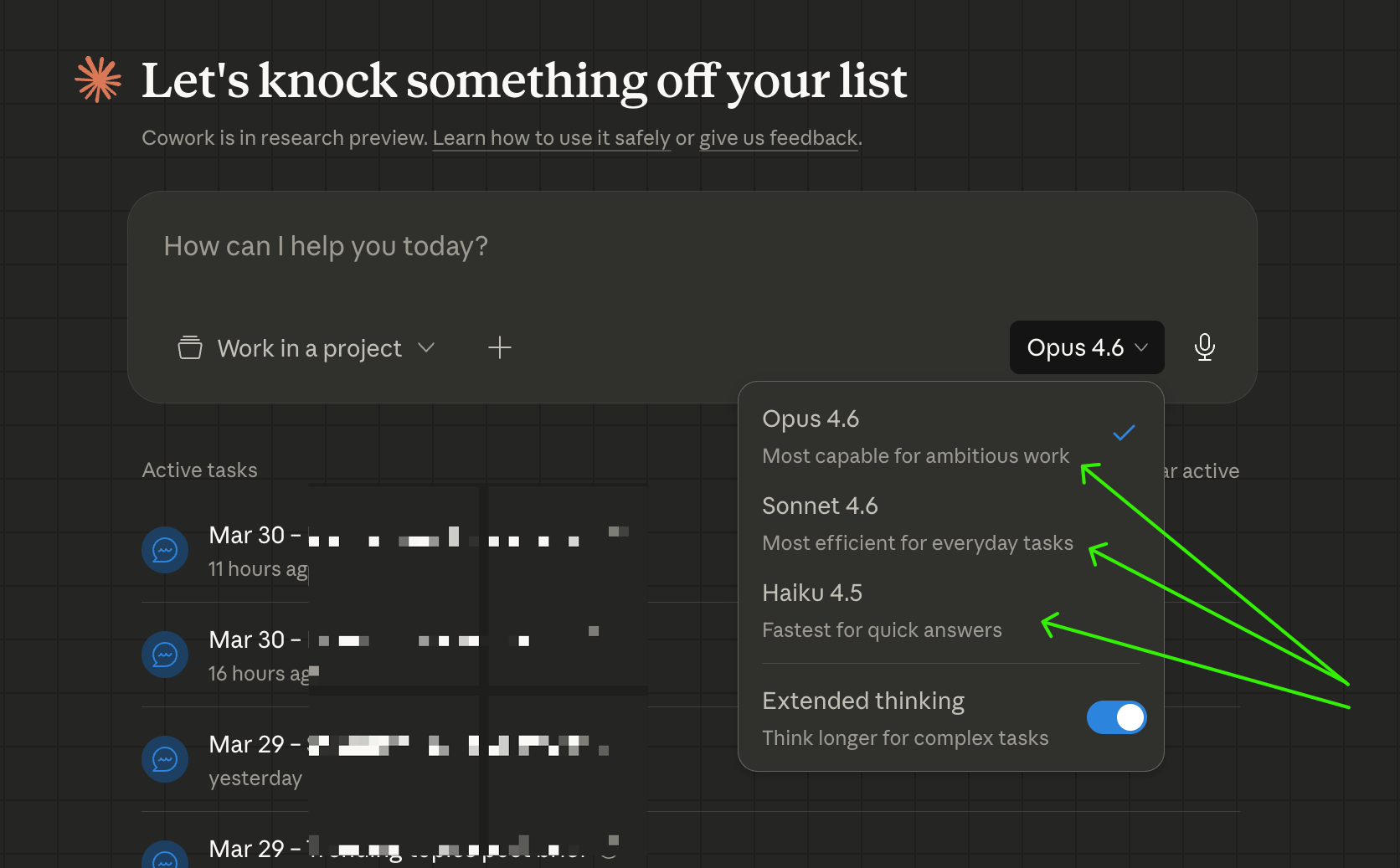
You can switch models in Claude Desktop — I checked, the picker is right there at the bottom of the compose window. But switching down to Haiku mid-conversation carries your full context history, and if that history is substantial (which any real working session will be), Haiku can’t hold it. The switch fails.
You can only switch up — from Haiku to Sonnet. Not down.
Which means the model decision has to happen before you type your first message. Not after. Not when you realize you’re burning through your limit. Before.
Anthropic built the most capable AI assistant available. They got a lot of us genuinely hooked — running our businesses on it, automating workflows, building things we couldn’t build before. And then, quietly, they made it more expensive to do the same amount of work.
A tale as old as time! The first one was free. Now you gotta pay. Sound familiar?

Meanwhile, Sam Altman is over at OpenAI announcing “no limits” on their Pro plan. That’s not a coincidence. That’s a direct message to every Claude user who’s frustrated right now. The timing is a little too clean.
(For the record: OpenAI’s “no limits” has fine print — Plus users still cap at 160 messages per 3 hours before dropping to mini models. But the marketing is doing its job.)

Here’s the thing. I’m not leaving Claude. The quality is still better for my actual work. The integrations I’ve built, the scheduled tasks running my newsletter operations, the way it understands context over long projects — none of that transfers to ChatGPT overnight.
But I’m also not going to pretend this isn’t happening.
The fix — the real one — is simple in theory and annoying in practice: you need to pick the right model before you start every conversation, because you can’t efficiently fix it after. The model decision is front-loaded.
For paid subscribers, I’m sharing:
The exact “thinking vs. doing” rubric — a task-by-task cheat sheet for choosing Haiku, Sonnet, or Opus before you open a new chat
The manual workflow audit prompt that classifies all your regular tasks by model tier and estimates what you’d save by switching
The scheduled task audit prompt I used to find reduce spend by $338 in token costs — including the one task eating 54% of my entire budget (and failing because of it)
The counter-intuitive finding: trimming your prompts saves almost nothing. Here’s what actually moves the needle.
So here’s the system. It’s not complicated — but it requires a small mental shift every time you open a new chat.
The question to ask before you type anything:
